
Package manager installation
To install ThingsBoard Gateway as python module, you should follow steps below:
1. Install required libraries to the system with apt:
1
sudo apt install python3-dev python3-pip libglib2.0-dev
2. Install ThingsBoard Gateway module with pip:
1
sudo pip3 install thingsboard-gateway
3. Download example of configs, create log folder:
-
Downloading configs example:
1
wget https://github.com/thingsboard/thingsboard-gateway/releases/latest/download/configs.tar.gz
- Make directory for configs:
1
sudo mkdir /etc/thingsboard-gateway - Make directory for logs:
1
sudo mkdir /var/log/thingsboard-gateway - Unpack configs:
1
sudo tar -xvzf configs.tar.gz -C /etc/thingsboard-gateway
4. Set permission to the folders:
- For logs folder:
1
sudo chown YOUR_USER:YOUR_USER -R /var/log/thingsboard-gateway
- For configs folder:
1
sudo chown YOUR_USER:YOUR_USER -R /etc/thingsboard-gateway
- For tmp folder:
1
sudo chown YOUR_USER:YOUR_USER /tmp
Where YOUR_USER is a user who will run the gateway.
5. Configure gateway:
First, add a gateway device to your ThingsBoard instance by following these steps:
-
Go to the “Entities” > “Gateways” page and click the “plus” icon in the upper right corner to add a new gateway.
-
In the opened modal window input the gateway name(e.g., “My Gateway”), specify the “default” device profile, and click “Create”.

Go to the “Entities” > “Gateways” page and click the “plus” icon in the upper right corner to add a new gateway.

In the opened modal window input the gateway name(e.g., “My Gateway”), specify the “default” device profile, and click “Create”.
Now, we have to configure gateway using right host, port and credentials, for this purpose use the following steps:
- Click the “General configuration” button, and copy Access token on the “General” tab;
- Open Terminal and execute the following command:
1
nano /etc/thingsboard-gateway/config/tb_gateway.json
- Paste copied access token and replace platform’s host and port with yours;
- Save changes and exit from nano.

Click the “General configuration” button;

Copy Access token on the “General” tab;

Open Terminal and execute the following command: nano /etc/thingsboard-gateway/config/tb_gateway.json. Paste copied access token and replace platform's host and port with yours. Save changes and exit from nano.
6. Configure logging:
- Click the “General configuration” button;
- Navigate to the “Logs” tab and replace the “File path” field value to:
1
/var/log/thingsboard-gateway
- Repeat the previous step for all tabs in the “Local logging” section;
- Click “Save”.

Click the “General configuration” button;
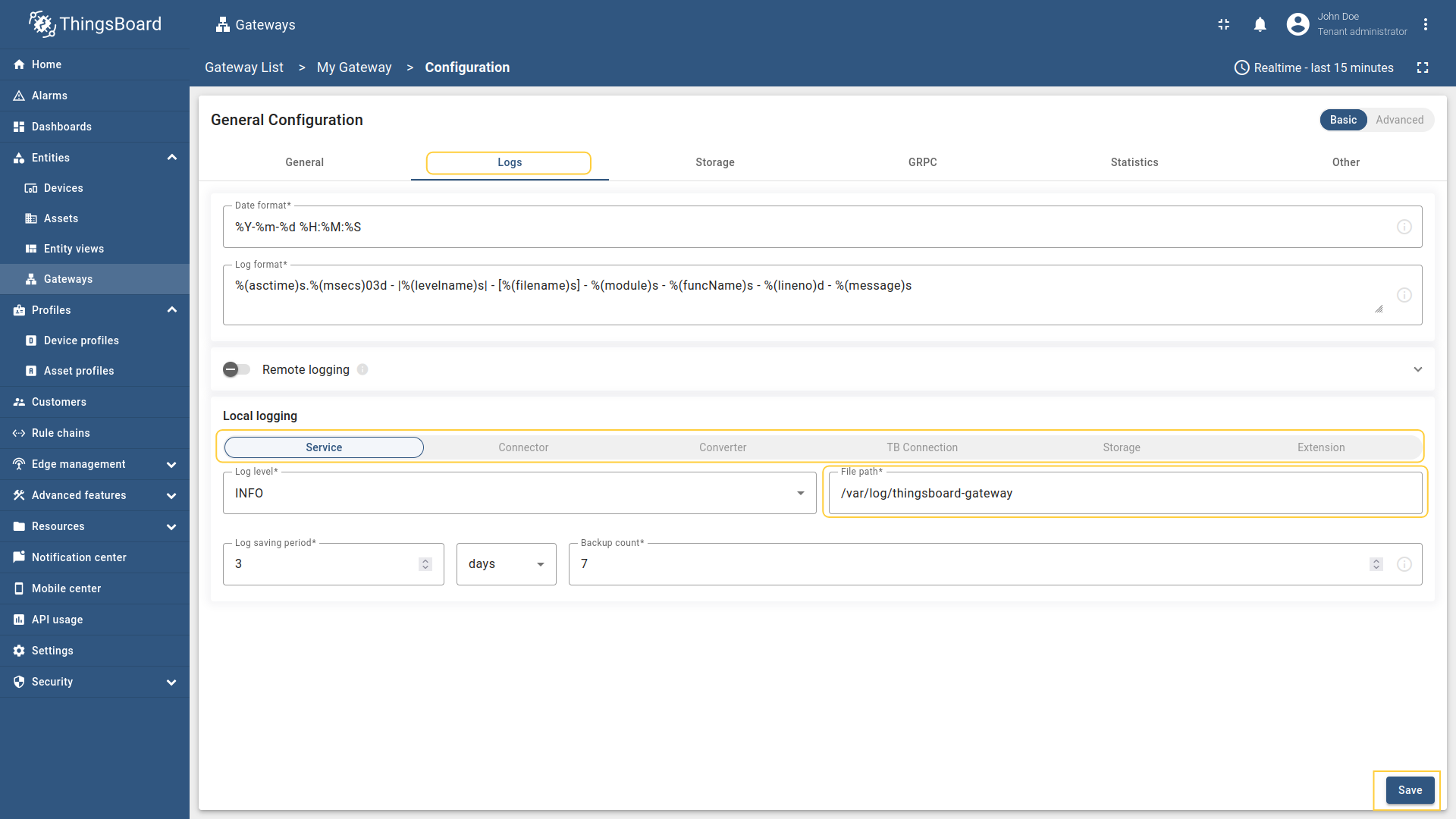
Navigate to the “Logs” tab and replace the “File path” field value to /var/log/thingsboard-gateway in all tabs. Then, click “Save”.
7. You can check installation with this command. For configuration please use Configuration guide:
1
thingsboard-gateway
- If everything is done correctly, you will see the gateway status set to
Active.
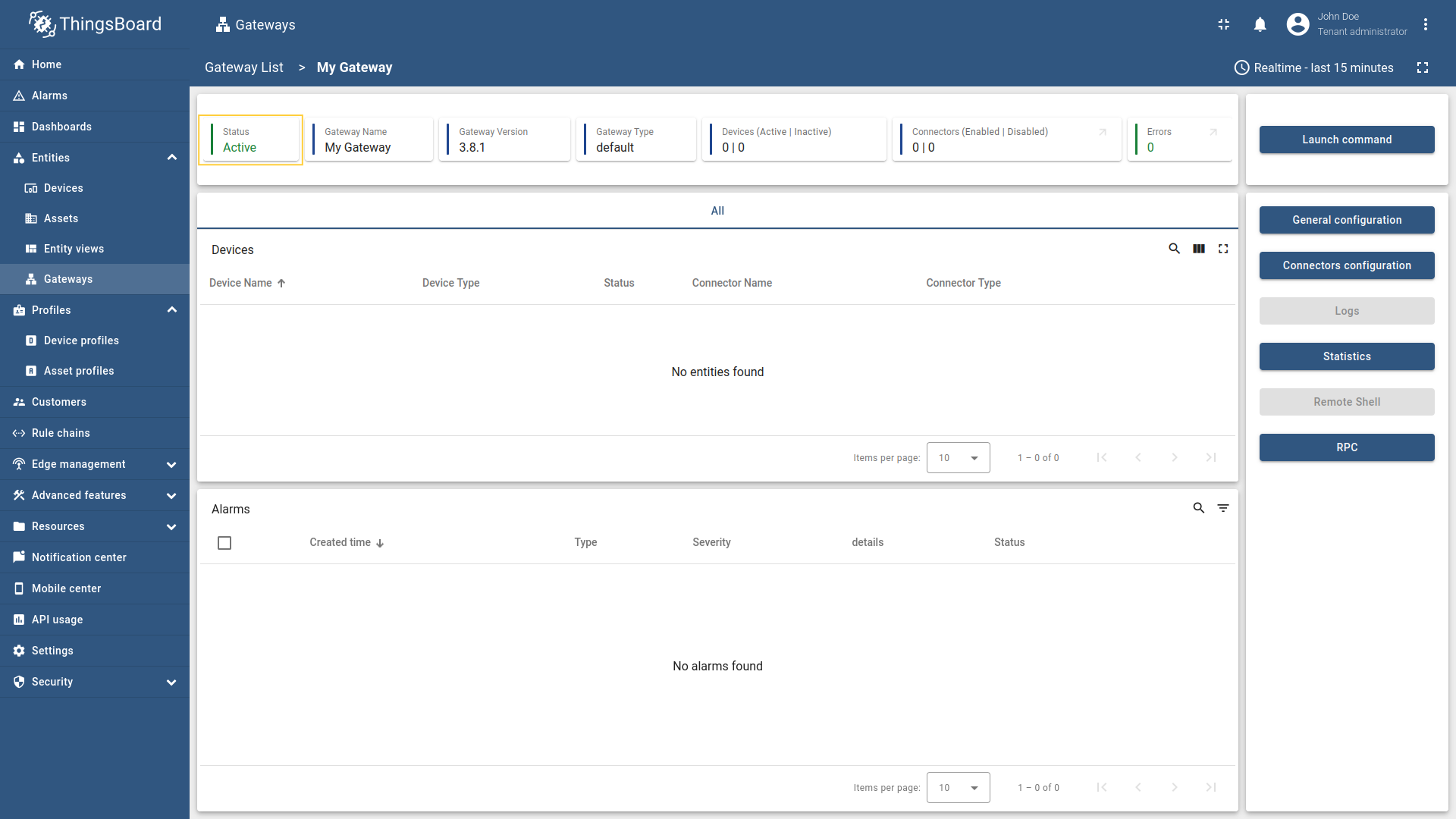
If everything is done correctly, you will see the gateway status set to Active.
Next steps
Explore guides related to main ThingsBoard features:
- Getting Started with ThingsBoard IoT Gateway.
- Data Visualization - how to visualize collected data.
- Device attributes - how to use device attributes.
- Telemetry data collection - how to collect telemetry data.
- Using RPC capabilities - how to send commands to/from devices.
- Rule Engine - how to use rule engine to analyze data from devices.